



Here are some frequently asked questions for BMW FEM/BDC function using Yanhua Mini ACDP/ACDP2.
Q1: What should I do when I encounter a FEM/BDC vehicle?
Start by identifying the FEM/BDC via OBD:
1.Connect the Mini ACDP to the vehicle’s OBD port.
2.Open ACDP APP, select BMW-> FEM/BDC-> OBD detect FEM/BDC
Depending on the detection result, proceed as follows:
✅ If detected as:
– Supports preprocessing: Yes
– Processed before: No
Action:
Remove the FEM/BDC module and connect it to Mini ACDP on bench. Follow the in-app Help document for initial programming.
✅ If detected as:
– Supports preprocessing: Yes
– Processed before: Yes
Action:
The module has already been initialized. You can proceed directly to key programming or mileage adjustment.
❌ If detected as:
– Supports preprocessing: No
– Processed before: No
Action:
This FEM/BDC version is not currently supported. Use BMW engineering software to read version info, downgrade/upgrade to a supported version, then reconnect on bench for programming.
Q2: How can I tell if the module is FEM or BDC?
A: Check the memory chip model:
- 95128-> FEM
- 95256-> BDC


Q3: FEM/BDC Cancel Bridge Resource Version
A: No need to connect the Electric bridge during FEM/BDC Initial Programming Process if your ACDP resource version up to 1.0.21.81 or above.

Q4: How to connect Yanhua ACDP and FEM/BDC module?
A: For BMW FEM module
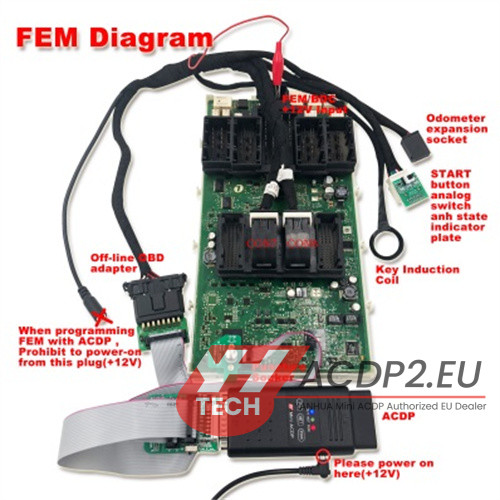
For BMW BDC module
