



Yanhua ACDP1/ACDP2 with Module 45 can read and write data and correct mileage for the newer VAG gearbox produced after 2022 DQ38x0DE/0GC, DQ500 0DL (bootloader of BH1G0401 and 7-pin connector). Follow this guide to check how to read and write DQ38x_GEN2 data.
Important Compatibility Note
Module 45 comes in two versions:
- ACDP1 Module 45 – works exclusively with Yanhua ACDP1
- ACDP2 Module 45 – works exclusively with Yanhua ACDP2
Both versions offer identical functionality. Just make sure you choose the one that matches your ACDP.
Step-by-Step Guide
Follow the guide below to learn how to read and write DQ38x_GEN2 data correctly and safely.
1.Before You Begin
First, confirm that the TCU is the new type with a 7-pin plug (refer to the figure). This is critical, as older gearboxes use a different connection method.
2.Hardware Setup
Connect Mini ACDP-1/ACDP-2 and corresponding Module 45 interface board to the gearbox.
Move the jumper cap to the “CAN-R” end (as marked).
Power on ACDP device

3.Software Procedure – Reading Data
Open ACDP app.
In the upper right corner, confirm that ACDP device is connected.
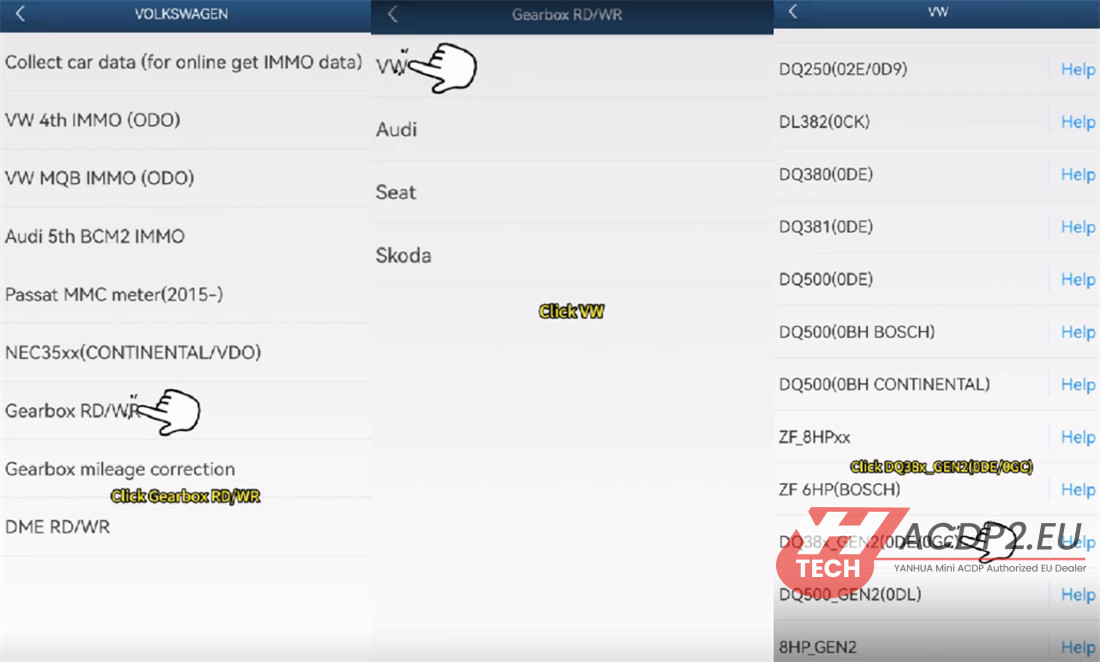
Tap VW/AUDI-> Gearbox RD/WR-> VW-> DQ38x_Gen2 (0DE/0GC)
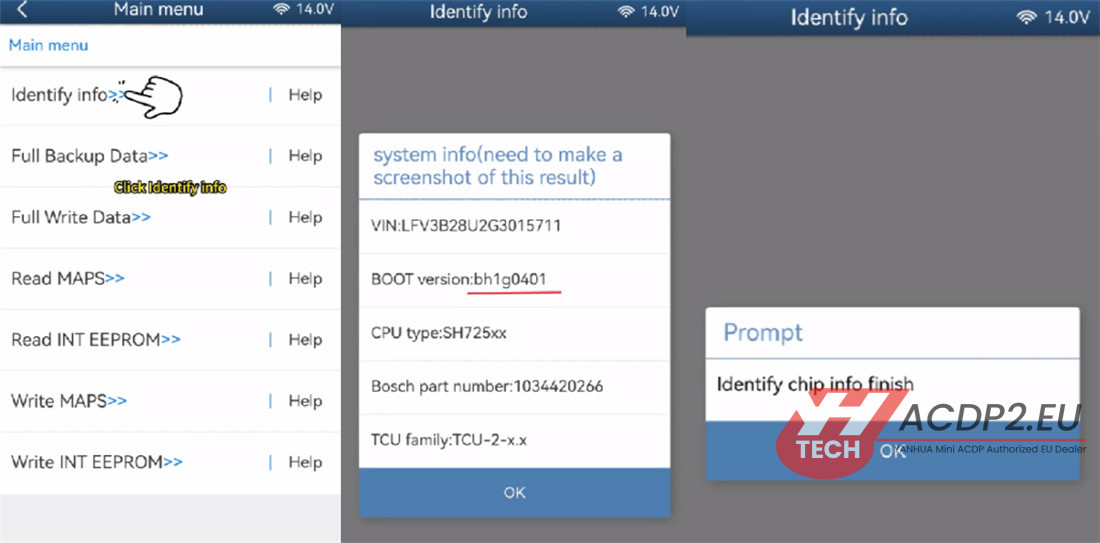
Tap “Identify info”
Tap Continue.
View the identify info. Confirm that the BOOT version is BH1G0401.
Take a screenshot and save it.
Tap OK.
Identify chip info. When finished, tap OK.
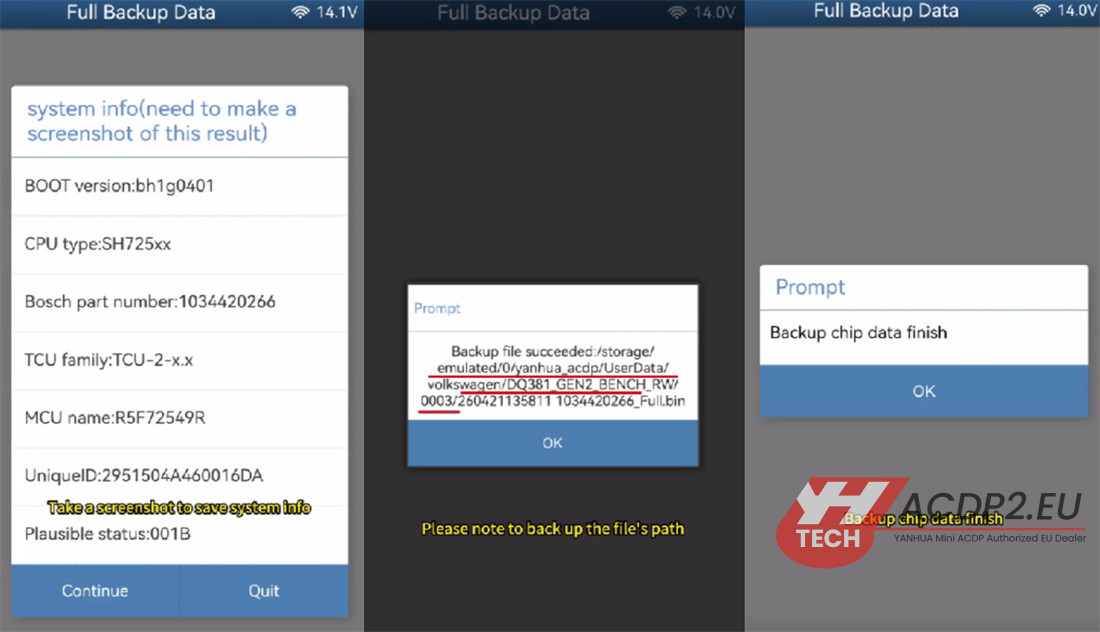
Tap “Full Backup Data”
Tap Continue.
Take a screenshot to save the system info.
Tap Continue.
Tap OK. You will now save the chip data.
Important: Note the backup file path, date, time, and part number. The file name must end with .bin.
Tap OK.
Backup complete. Tap OK.
4.Software Procedure – Writing Data to Another Gearbox
Disconnect the first transmission gearbox.
Connect to another DQ381 Gen 2 gearbox.
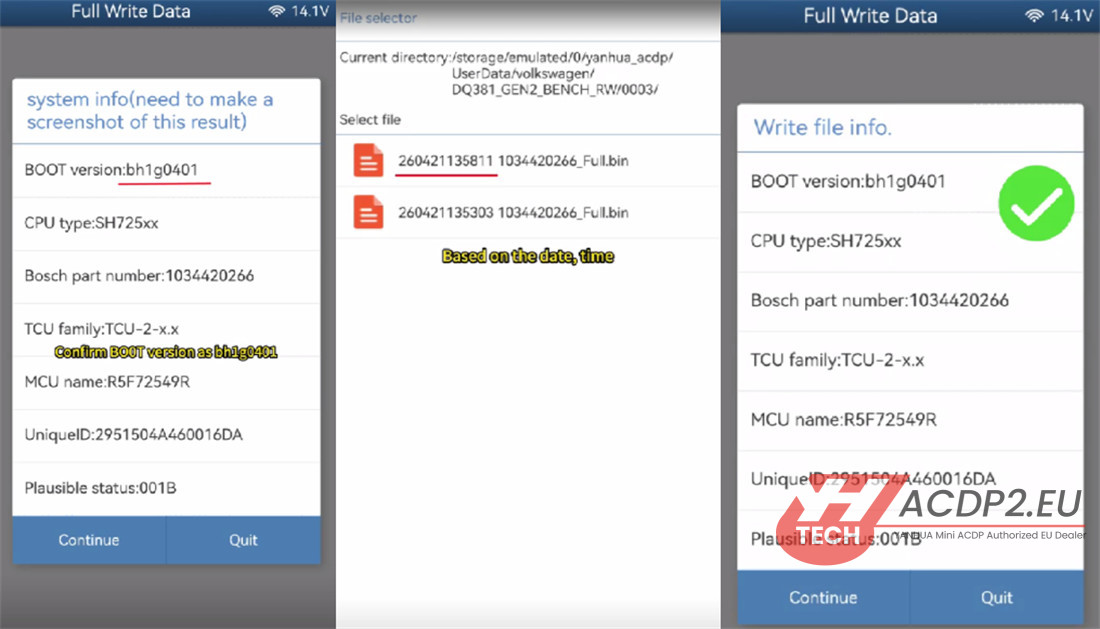
Tap Full write data.
Tap Continue.
View the identify info. Confirm that the BOOT version is BH1G0401.
Take a screenshot and save it.
Tap Continue.
Tap OK. Select the chip data file.
Based on the date, time, and part number, select the correct .bin file.
Verify that the information written in the file is correct.
Tap Continue.
Read to write chip data, please don’t cut the power nor pull out the device during the programming!
Tap Continue again.
Writing is complete.

Conclusion
You have successfully read data from one DQ38x_ Gen 2 gearbox and written it to another one using Yanhua Mini ACDP with Module 45 on bench. Always double-check the BOOT version and backup file details to avoid errors.
Video guide:
Learn more:
Yanhua Module 45 for DQ38x_GEN2 Gearbox Mileage Correction Guide
Yanhua Module 45 for DQ38x_GEN2 Gearbox Mileage Correction Guide
Yanhua Module 19 VS Module 25 VS Module 30 VS Module 45