



Yanhua Mini ACDP2 with Module 44 enables key adding and key ID modification for VW, Audi and Porsche with 5C 5D immobilizer systems. This post takes VW 5C Magotan as an example to show the operation process. Follow the steps below to complete the key programming successfully.
1.Initial Setup
Connect ACDP to the vehicle’s OBD interface using the OBD cable.
Turn on the ignition and ensure the instrument cluster lights up.
Open ACDP app and confirm that an ACDP programmer is bound (check the top right corner).
2.Vehicle Identification
Select VW-> VW MQB IMMO (ODO)-> MQB49 IMMO 5C/5D-> OBD identify info

Verify the vehicle information, including the number of keys and key IDs.
Take screenshots for backup, then click Continue.
Review the identification info and click OK.

3.PCF Key Reading
Tap PCF help and properly connect PCF key to Mini ACDP2.
Place the original key into the PCF.
Click PCF read key info.
Note: If the software indicates that the PCF key adapter version is low, please perform an upgrade.
To upgrade: return to the main menu, tap Special function, then Adapter upgrade, then PCF key upgrade. After completing the upgrade, continue to the next step.
Click Continue, verify the identified original key info and key ID, and take a screenshot to save. Click Continue.
Confirm whether the key supports ICP, then click OK.


4.ICP Key Programming
Disassemble both the original key and the new key.
Click ICP +OBD add key, then tap Help to view key types.
Since this video uses the VW 5C Magotan as an example, click VW 5C Magotan, then tap Help.

Properly connect the original key board to the interface board and ACDP2.

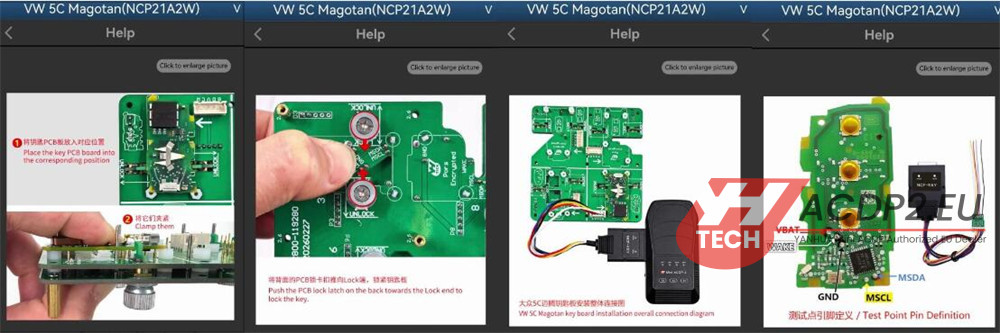
Click Step 1: ICP read work key, then click Continue.
Review the key information and click Continue, then click OK to save the original key data.
Important: Note the backup file path, date, time, and key ID. The file name should end with .bin.
Click OK, view the immobilizer information, and take a screenshot or copy the CS code for backup if needed. Click OK.
After reading the key data, click OK to finish.

Replace the original working key plate with an original blank or an original used locked key plate.
Click Step 2: ICP write new key, then click Continue.
Verify the key information and confirm ICP support, then click Continue.
Click OK, select the original key data based on date, time, and key ID. Choose the original car file ending in .bin and verify the information. Click Continue, then click Continue again.

“Make dealer key” will appear—click OK to finish.

5.Optional: Modify New Key ID
To ensure smooth vehicle programming in the future, it is recommended to change the new key ID to a lost key ID. This step is not mandatory.
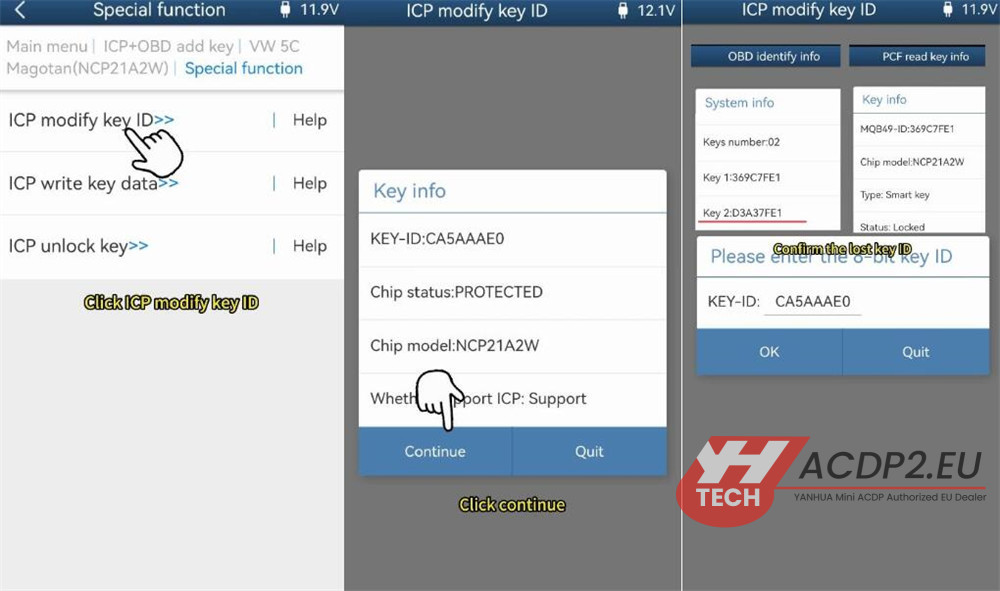
Click Special function-> ICP modify key ID.
Click Continue, then Continue again.
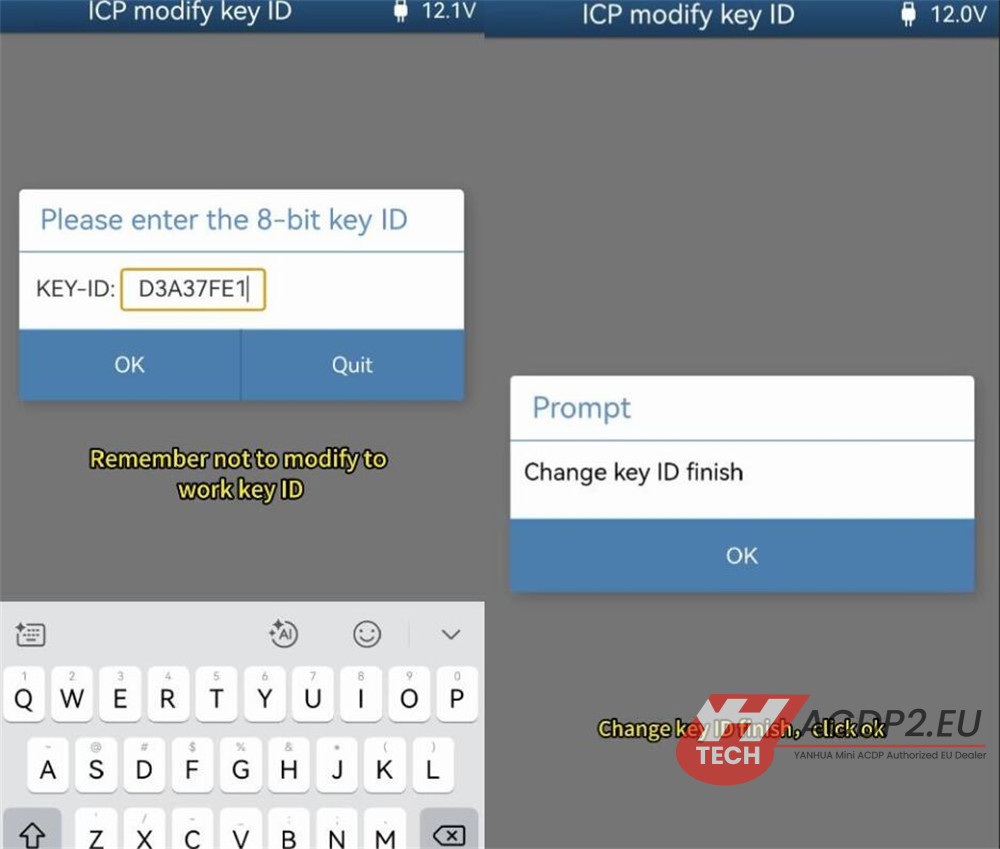
Refer to the key ID from the OBD information saved earlier and the key ID read by the PCF adapter to confirm the lost key ID.
Delete the current ID and enter the lost key ID. Be careful not to modify it to a working key ID. Click OK, then click Continue.
“Change key ID finish” will appear—click OK.
6.OBD Key Learning
Go back to the previous level and disconnect from the interface board.
Connect Yanhua ACDP2 to the vehicle’s OBD interface.
Reassemble the original key and new key shells, and install the key batteries.
Turn on the ignition, light up the cluster, and open the hood.
Click Step 3: OBD learn key, then click Continue.
Verify that the vehicle information and key quantity are correct, then click Continue.
Select “Load or car key data,” then click Continue, then OK.
Choose the original key data based on date, time, and key ID. Select the original car file ending in .bin and verify the information. Click Continue.

Here shows learning two keys. Delete the default number, enter 2, and click Continue.
Ensure all keys are ready. Important: Keys that are not learned will not start the vehicle. Click Continue.
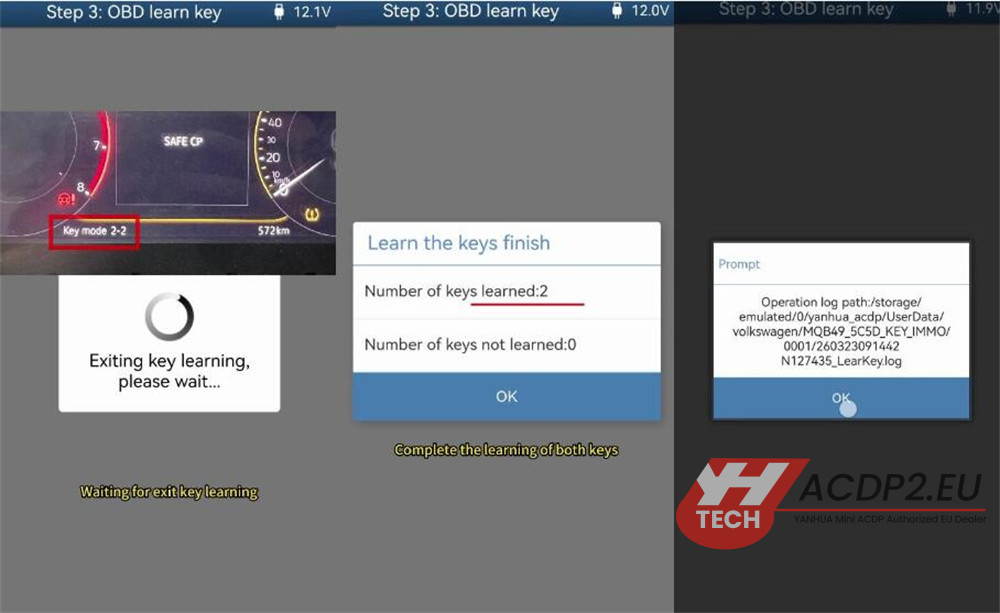
Place the first key near or into the induction coil, then click Continue. The instrument cluster will display “1/2,” indicating the first key is matched.
Place the second key near or into the induction coil, then click Continue. The instrument cluster will display “2/2,” confirming the second key matching is complete.
Wait for the key learning session to exit. Once both keys are successfully learned, click OK.

7.Final Verification
Verify that both the original key and the new key function properly.
Video guide: