



This guide provides detailed instructions for copying BMW U chassis BCP ICP keys using Yanhua ACDP2 on bench.
Prerequisites:
Update ACDP software to the following minimum versions:
- ACDP Software: V1.0.64 or higher
- ACDP2 Software: V2.0.8 or higher
- Android App: V3.0.141 or higher
- IOS APP: V3.6.4 or higher

Requirements:
- Yanhua Mini ACDP/ACDP-2
- Yanhua ACDP Module 38 license
- Yanhua BMW BDC3/BCP Interface Board Kit
Key Copying Procedure:
Step 1: Prepare the Original Key
Disassemble the original BMW chassis BCP key.
Confirm whether the key has UWB functionality or not.

Step 2: Initialize ACDP Application
Open ACDP App.
Verify that an ACDP programmer is bound (check top right corner).
Navigate through the menu:
Click BMW -> FEM/BDC -> IMMO/Mileage -> BDC3/ BCP ICP CopyKey -> Special Function.

Step 3: Identify Key Information
Connect ACDP device to BAV key adapter properly.
Place the original car key with its induction coil facing downward, laying flat on the adapter.
Select Identify Key Info by BAV Adapter -> Continue -> OK.
Save the key data and click OK.

Verify the original key information and take a screenshot for your records.
Click OK -> Read Key Data -> Finish -> OK.
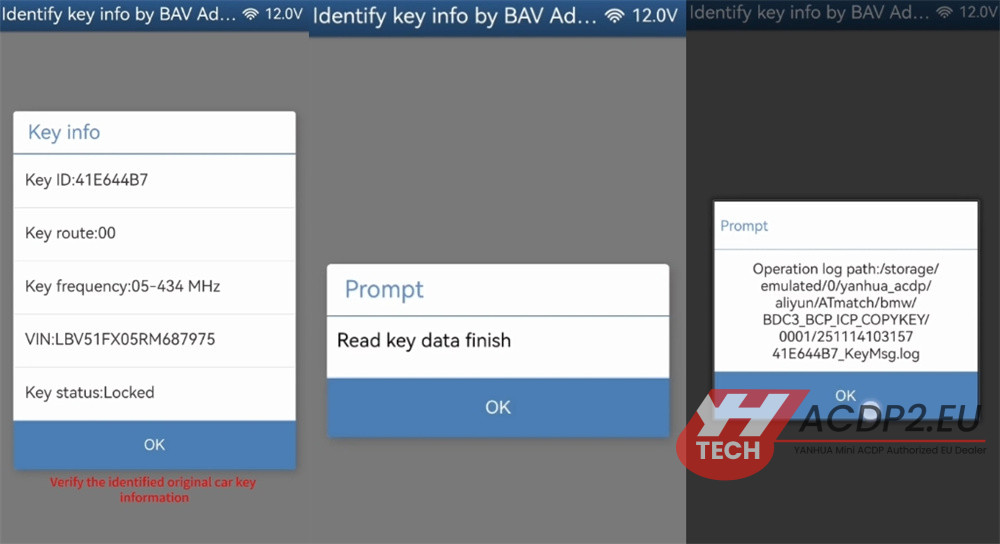
Step 4: Read and Backup Original Key Data
Return to the previous screen and select Help for U-BCP.
Connect the following components properly:
- Original BCP car key
- Yanhua BCP key ICP interface board
- Yanhua ACDP2 key programmer

Select U-BCP (NCF295E) -> Read Orig-Key Data -> OK.
Confirm that the original key information is correct and click OK.
Note the backup file path, date, time, VIN, and Key ID.
Ensure the file name ends with the .bin extension.
Click OK -> Read Key Data -> Finish -> OK.

Step 5: Write Data to New Key
Replace the original key with a blank new key.
Select “Write New Key Data”.
Important: Do not connect the original key at this stage to avoid data loss or key damage.
Click OK and confirm that it is a new blank key.

Select the original key data file (with .bin extension) based on the recorded date, time, VIN, and Key ID.
Verify that the selected original key information is correct.
Click OK -> Write Key Data Finish -> OK.
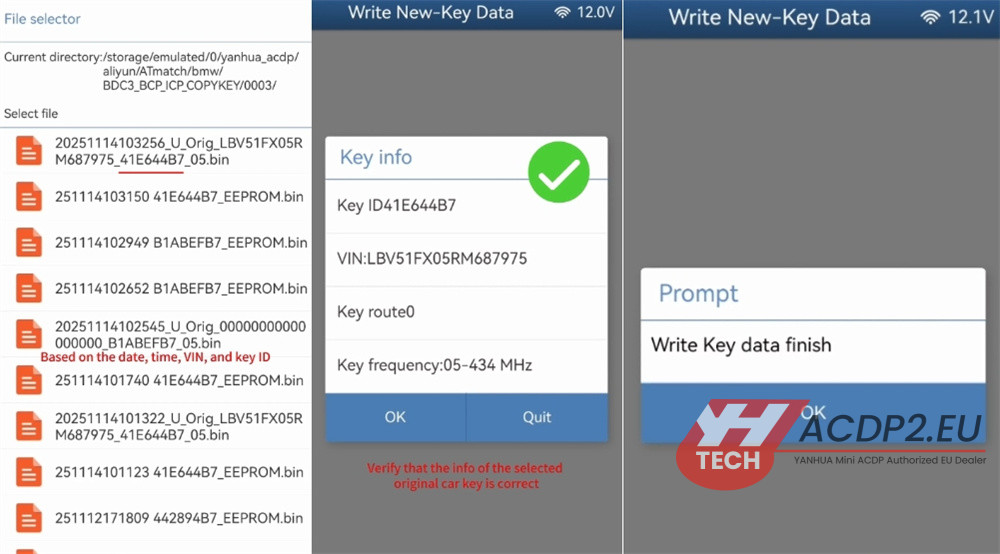
Step 6: Verify the New Key
Replace BMW BCP key ICP interface board with the BAV key adapter.
Place the newly copied key flat on the adapter.
Go back to Special Function -> Identify Key Info by BAV Adapter -> OK.
Confirm that the information of the new BCP key matches the original key.
Click OK.

Step 7: Final Check
Reassemble both the original key and the newly copied key into their cases.
Enter the vehicle and test both keys to ensure they function properly.
Video guide:
Read also: